eslint 规则很多,大家肯定也没有一一看过,但是很多规则我们平时却已经在”遵守“着了,这正可谓是
道者,人之所蹈,使万物不知其所由 —— 张元浩
我们今天就来探寻下 eslint 的”道“
Q:你可能会遇到 eslint 报了个错,但不知道什么原因,那么你该怎么办呢?
一.了解规则
eslint (没有下面带前缀的): http://eslint.cn/docs/rules/
eslint 自带的规则
import/xxx: https://www.npmjs.com/package/eslint-plugin-import
该插件旨在支持 ES2015+(ES6+)导入/导出语法,并防止文件路径和导入名称拼写错误的问题。
jsx-a11y/xxx: https://www.npmjs.com/package/eslint-plugin-jsx-a11y
Static AST checker for accessibility rules on JSX elements. (静态 AST 检查器,用于 JSX 元素上的可访问性规则。)
不用这个插件的,eslint parse 时到 ASTNode 为 JSXxxx 就跳过去了? 不一定,比如 eslint 自带jsx-quotes。
(具体涉及 eslint 实现,见后文)
react/xxx: https://www.npmjs.com/package/eslint-plugin-react
react 相关
react-hooks/xxx: https://www.npmjs.com/package/eslint-plugin-react-hooks
react-hooks 相关
@typescript-eslint/xxx: https://www.npmjs.com/package/@typescript-eslint/eslint-plugin
typescript 相关
没必要一个个规则都看,但是我们可以给这些规则分个类
1.风格
1 | 'quotes': 'single'; |
2.code review
不太清晰
1 | var foo = { |
更清晰:
1 | var foo = { |
1 | 'comma-dangle': [ |
3.防止出错
1 | // 禁用不必要的转义字符 |
真人真事:本地没问题,线上打包 js 中的正则字符串会转成了 unicode (我也不知为啥会转,可能和 webpack 有关),不必要的字符不能正确识别,导致一个正则失效了。造成公司巨大损失!(这句我瞎编的)
正则字符组中:会改变字符组含义的才需要转义
1、反斜线必须转义
2、方括号必须转义
3、[^] 在首和[-]在中必须转义
所以以下常见的字符在字符组中是不需要转义的
1 | [aeiou] |
4.性能
…
5.宿主环境
1 | 'no-console': 'warn' |
…
其实,看看这些规则也可以了解一些 js 基础
二. eslint –fix
为什么有些可以 fix,有些不能呢?
取决于相应规则的实现
http://eslint.cn/docs/developer-guide/working-with-rules#applying-fixes
[看源码]
三. eslint-disable
1.在文件中临时禁止规则出现警告
将需要忽略的代码块用注释包裹起来
1 | /* eslint-disable */ |
2.对指定规则的启用或者禁用警告
将需要忽略的代码块用注释包裹起来
1 | /* eslint-disable no-alert, no-console */ |
3.对指定行禁用规则警告
有两种形式
1 | alert('foo'); // eslint-disable-line |
4.在指定行上禁用指定的某个规则
1 | alert('foo'); // eslint-disable-line no-alert |
5.在某个特定的行上禁用多个规则
1 | alert('foo'); // eslint-disable-line no-alert, quotes, semi |
四.使用 overrides
1 | "overrides": [ |
Q:一个项目,我该如何配置它的 eslint 规则?
plugin: 扩展 eslint 规则的定义
extends: 现成的设置好的规则,可覆盖 plugin 的默认配置,存在多个时后面的覆盖前面的
rules: 用户配置,可覆盖 extends 中的配置
overrides: 可针对特定文件进行校验规则的覆盖
env: - 指定脚本的运行环境。每种环境都有一组特定的预定义全局变量。
globals: - 脚本在执行期间访问的额外的全局变量。
parser: http://eslint.cn/docs/user-guide/configuring#specifying-parser
parserOptions: http://eslint.cn/docs/user-guide/configuring#specifying-parser-options
…
一.复杂配置–
1 | // 原教旨主义者 |
二.简单配置++
1 | // 自立根生,艰苦奋斗 |
三.总结适合自己团队的配置
1 | // 走自己的特色道路 |
@umijs/fabric: https://github.com/umijs/fabric/blob/master/src/eslint.ts
https://github.com/umijs/umi/blob/master/packages/babel-preset-umi/src/index.ts
Q:为什么 prettier 的配置总是写在后面?
在我们现在的工作流里,有个 lint-staged
1 | "lint-staged": { |
如果 prettier 配置优先级不是最高的,会导致 prettier 完了,eslint 却通不过,陷入死循环。
当然,在保证相关配置相同的情况下这个顺序是无所谓的。
prettier 中的 rule 并不多,多是些”代码风格”类型的规则 https://prettier.io/playground/
Q:eslint 如何工作的?
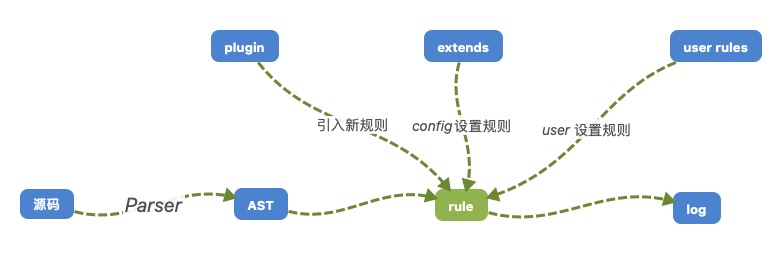
node 命令行工具 https://github.com/eslint/eslint
vscode 插件 https://github.com/microsoft/vscode-eslint
Q:怎么搞一套自己的 config?
https://eslint.bootcss.com/docs/developer-guide/shareable-configs
以 eslint-config-xxx 为例
Q:怎么搞个自己的规则?
https://eslint.bootcss.com/docs/developer-guide/working-with-plugins
以 import/no-unresolved 为例
可以自动 fix: 以 jsx-quotes 为例